Built for Forza Horizon 6 · webcam only

Head tracking, for Forza Horizon 6. From just a webcam.

Turn your head and the cockpit view follows. A free head tracker built for Forza Horizon 6 that runs on nothing but your webcam. No TrackIR. No Tobii. No game files touched.

Windows 10 / 11 Works fully offline Any wheel or pad Open source
01 / DEMO

Feel it
before you install

Real in-game footage and the app itself, then an interactive sim of the exact mapping it runs, deadzone, response curve and all.

In-game footage · FH6

Webcam head tracking driving cockpit free-look in Forza Horizon 6 — no extra hardware.
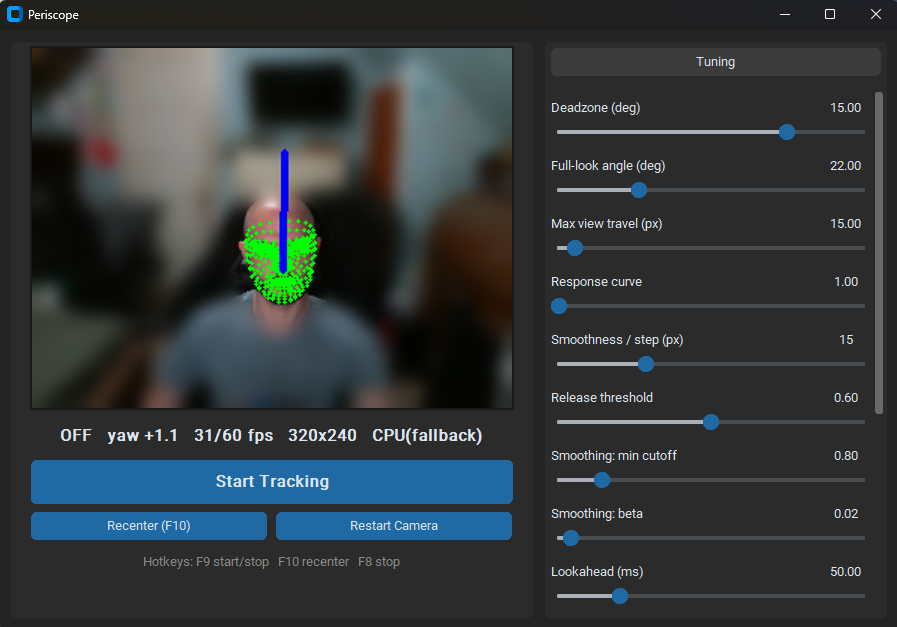
The Periscope app: live webcam preview with face-mesh overlay and yaw indicator, status bar, and the full tuning panel.
The app · preview + tuning

The control panel you actually run — face-mesh preview with background blur, and every tuning slider on the right.

Or play with the live simulation — drag the yaw control, or grab the view itself.
CABIN VIEW
FH6 · COCKPIT
YAW 0.0°
OFFSET 0
● AUTO DEMO — grab to drive

Telemetry

Head yaw0.0°
View offset0 px
Drag your head yaw
or click-drag directly on the view

Toggle the features

Turn off "recenter" and sweep side to side — watch the view stop returning to true center. That drift is the bug recenter fixes.
02 / FEATURES

What you get

Built for immersion, tuned to disappear. Everything runs on your machine.

Just a webcam

No TrackIR clip, no Tobii bar, no IR LEDs. Any built-in or USB webcam tracks your head pose with on-device AI.

100% offline

Everything runs on your PC. No accounts, no servers, no telemetry. Play in Solo without a connection.

Wheel friendly

Drives the cockpit free-look through the mouse channel, so it never fights your wheel, pedals or pad. Glance at the apex, keep both hands driving.

Stays steady

Small twitches and camera noise get filtered out. Deliberate movement comes through clean. When you stop, the view stops too — no drifting, no shaking.

Tune everything live

A simple control panel with sliders for sensitivity, range, smoothing and the center snap. Changes apply instantly, no restart, settings saved.

No game files touched

It only sends mouse input. Nothing is injected, patched or modified. Single executable, drop it next to the game and go.

03 / PIPELINE

How it works

Three stages, all on-device, about as simple as it gets.

STAGE 01

Webcam

Your camera feeds frames to the tracker at video rate.

STAGE 02

Tracker

The app watches which way your head is pointing and smooths it out.

STAGE 03

Free-look

Mapped to mouse free-look. Turn your head, the cockpit pans, return and it recenters.

04 / GET STARTED

Set up & run

Three minutes from download to driving. Grab the app, set up your game, hit F9.

STEP 01

Download & launch

Click the download button at the top of this page and run Periscope.exe. First launch takes 10–15 seconds. Windows will ask for camera permission — allow it.

STEP 02

Set up your game

Switch to cockpit / interior view. Bind free-look to Right Mouse Button (FH6's default). The tracker drives free-look by pressing RMB and moving the mouse — no game files are touched.

STEP 03

Calibrate & tune

Look straight ahead, press F9 — your current head pose becomes neutral and tracking starts. Use F10 any time mid-game to re-establish neutral if it drifts. Defaults are tuned for subtle glance behavior, dormant inside your ±10° comfort range.

Hotkeys — work anywhere, even while the game has focus

F8Emergency stop. Kills tracking immediately and releases the mouse, in case anything ever feels stuck.
F9Toggle tracking. Start/stop. The toggle survives game focus and Alt-Tab.
F10Recenter. Sets your current head pose as the neutral / forward position. Use this any time the view feels off-center.

Get the feel right

  • Want bigger head turns to look further? Open the tuning panel and slide Full-look angle higher.
  • Want a wider dead zone before anything happens? Slide Deadzone higher.
  • View moves too much in game? Lower the game's look sensitivity, then slide Max view travel a bit higher to smooth things out.
  • Want a snappier response? Slide Lookahead up.
  • Seeing little wobbles? Slide Lookahead down. Smoothing sliders can also be raised.

If something's off

  • The picture stutters or feels choppy. Add a desk lamp aimed at your face — webcams quietly cut their frame rate in dim light, and brighter light is the single biggest fix.
  • The view shakes when you turn your head sideways. Same answer — more light. Past about 20° to the side, your webcam has a harder time seeing your face clearly.
  • Nothing's happening when you turn. Make sure you pressed F9 to start. Check that your game is in cockpit / interior view and that free-look is bound to the right mouse button.
  • The center has drifted. Look straight ahead and tap F10 to reset where "forward" is.
  • Want to bail. F8 stops everything instantly.